
Top 10 Claude Code Usage Tips: Benefit from Knowing Early

 Prefer us on Google


Original Article Title: "10 Claude Code Tips I Wish I Knew Sooner"
Original Article Author: Ironhammer, AI Analyst
Here are some Claude code tips that I have been reflecting on for over half a year, wishing I had known them sooner.
They have saved me a significant amount of time and allowed me to enter a smooth state while coding and creating content.
The article is divided into three parts:
1. Three Startup Methods
2. Tips for Use During Runtime
3. Using Companion Software to Address Human-Machine Collaboration Efficiency
All of this is designed to help you focus more on programming and other tasks at hand.
I wish someone had sent me this tutorial a few months ago to help me avoid detours and achieve a smooth experience:
1. Save this guide, and spend 30 minutes this weekend mastering Claude code tips.
2. Share it with anyone who asks you, "I find Claude code difficult, but I have never tried it."
Now, let's start with the simplest way to get Claude up and running (yes, even starting up has its tricks)
Claude Startup: Three Methods
Simple Startup
Starting up Claude is a very simple task, easy on the command line.
But for friends who are not fans of command-line tools, Claude code is actually a visual interface.
How is this achieved?
On this website: https://claude.com/download, under Claude Desktop, follow the steps below to get a visual Claude.
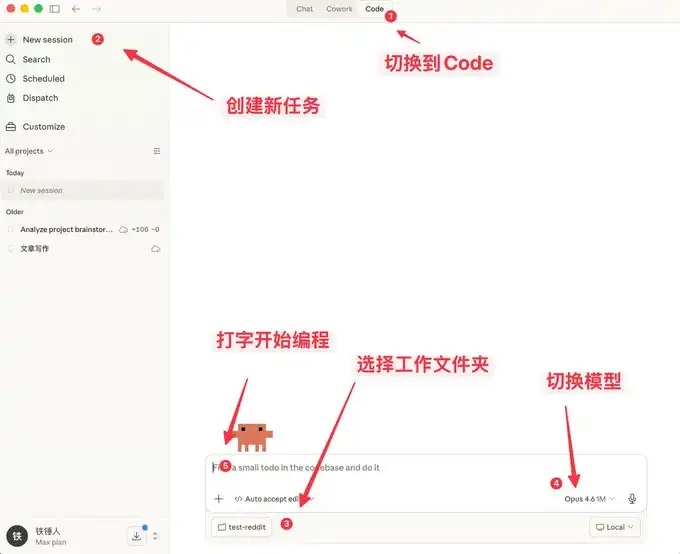
Here you can not only chat, but also enjoy many features similar to OpenClaw.
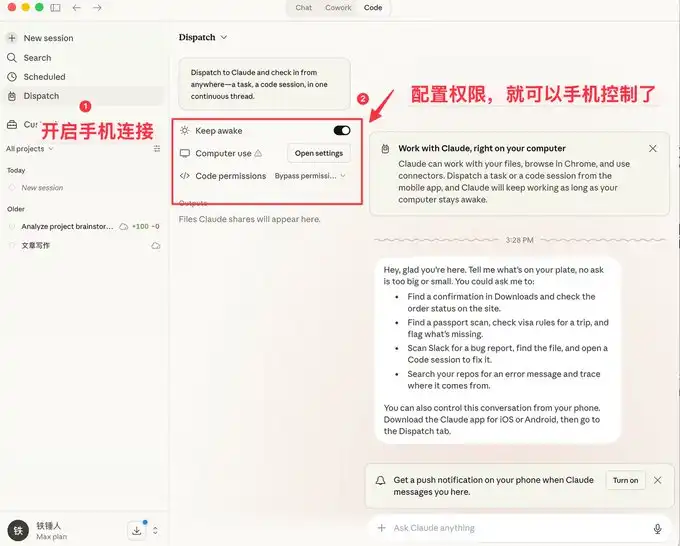
A visual interface is more user-friendly for the general public, but developers prefer the command-line startup method.
Below are some quick-start commands to introduce to everyone.
Command-Line Startup
-- Price
On Specific Historical Startup
When using Claude code, we often encounter situations where a reboot is necessary, and each time we restart, we need to restore the previous context:
I used to always use:
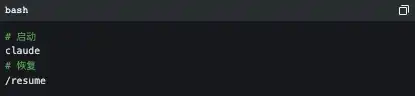
However, the official documentation actually provides some very nice startup commands:
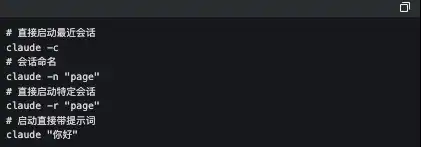
Among these, the one I frequently use is claude -c, a short command that has saved me a lot of time.
-p to Start in an Automated Way
Claude Code can be started in a UI-less manner; simply use the following command:

It is worth noting that if you want to use a local subscription token for automated tasks, currently only this method can be used.
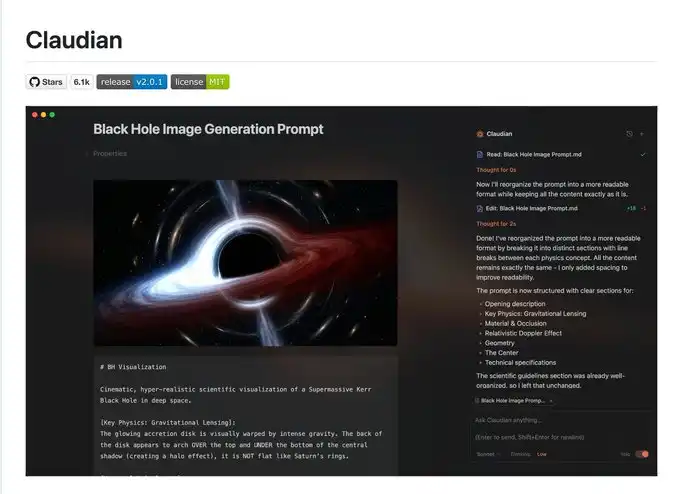
Below is the well-known Obsidian + Claude Code tool, which is a self-made SDK for using a local subscription token in this way.
I admit that what I said earlier may be a bit complex, so let's talk about a few simple commands used in the process.
3 Handy Tips to Know While Running Claude Code
Gracefully Stop and Roll Back Tasks
When you first start using Claude code, you may tend to use Ctrl+C to close the current dialogue, only to unintentionally close Claude altogether. The correct way is to press the Escape key once to immediately interrupt the dialogue and prevent things from escalating.
If Claude suddenly becomes unresponsive, you can press Escape twice, and then a list will pop up:
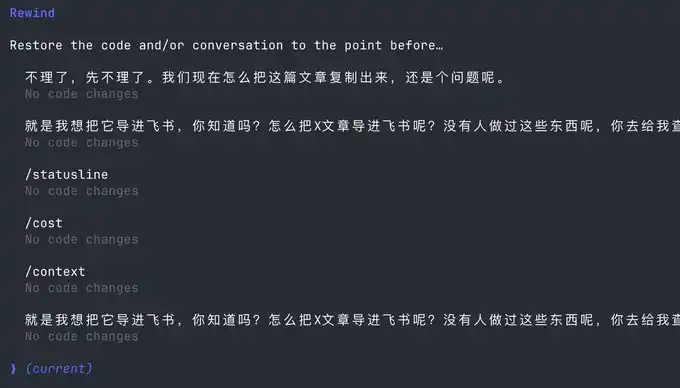
You can use this feature to go back to any checkpoint, avoiding Claude's code messing things up.
Stay with Claude Command Execution
Sometimes we want to run a test command ourselves, but to stay current with Claude, we have to open another command window.
Actually, we can use the following syntax:

Context Management
As the conversation continues, the more chat history we accumulate, the more tokens are consumed in each interaction, causing Claude's code to run slower and slower.
You have two choices: open a new window or use the /clear command
A simple command, clearing out unused contexts, is like closing 20 Chrome tabs at once.
But what if I don't want to clear out these contexts? Use /compact to compress them a bit.
It's like giving Claude a Red Bull to boost his brain.
Hope the above tips can help you use Claude's code more smoothly.
However, this is far from enough. Since Claude's code is a command-line tool, no matter how many commands you learn, it's a mental burden.
Fortunately, many complementary software solutions have emerged in the community to address the following pain points:
1. There is no mature method for autocomplete, leading to low programming efficiency
2. People type relatively slowly, resulting in low autocomplete efficiency
3. In multitasking processes, people are fragmented, unable to improve productivity
If any of the above is one of your pain points, please continue reading.
Using Complementary Software to Solve the Human-Machine Collaboration Problem
Now, we are starting to realize that humans are falling behind the speed of machines. To address this issue, a series of software solutions has been introduced in the community.
First, we need a mature programming methodology:
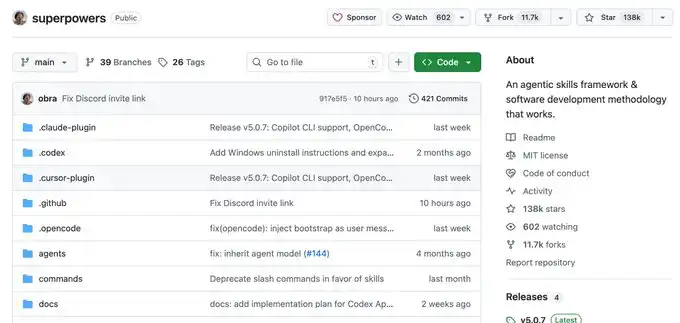
Superpowers
When an ordinary person vibes coding, they do it haphazardly, coding whatever comes to mind. This Skills is a programming workflow summarized by an old programmer.
He has packaged top software engineering best practices into a one-click Skills. From requirement gathering, spec confirmation, detailed planning, to TDD test-driven development + automatic code review, the entire process follows a mandatory structured workflow, enabling AI to output high-quality, maintainable code like a mature engineering team, significantly increasing the one-pass rate and eliminating the need for repeated firefighting.
This project already has 138k Stars; you can learn more details about it yourselves, and I won't elaborate further.
Once you have a set of mature programming Skills, you will find that it requires you to input information frequently. This is when you realize that your typing speed becomes your efficiency bottleneck.
You might be thinking, Is there any software available that can quietly transcribe whispered office conversations into text with extremely accurate Chinese and English recognition?
Yes, there is, and there are many of them, but I only recommend two: typeless and Beankey Input Method.
Voice Input Software
The advantage of the Beankey Input Method is that it is fast, the Chinese and English recognition is decent, and most importantly, it is free. It's a bit like the Android system, and I also use it.
However, typeless, apart from being paid, doesn't have many drawbacks and is worth trying out.
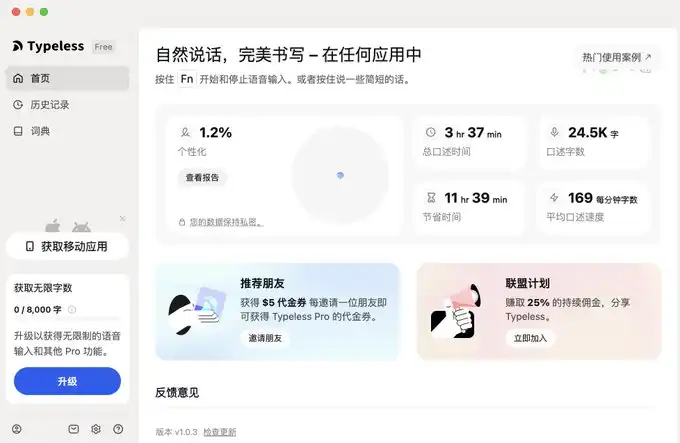
I have provided the links below.
For typeless, the link is: https://www.typeless.com/?via=lxfater
Beankey Input Method is still in the testing phase, and you can find the installation package by searching for it.
Once we start using voice input, we will be able to provide more context to Claude code, and the one-pass rate will continue to increase. At this point, the bottleneck of efficiency lies in the execution time of Claude code.
We can run multiple instances of Claude code simultaneously; however, at this point, our bottleneck is the human multitasking issue of losing context.
Solve Your Context Switching Problem
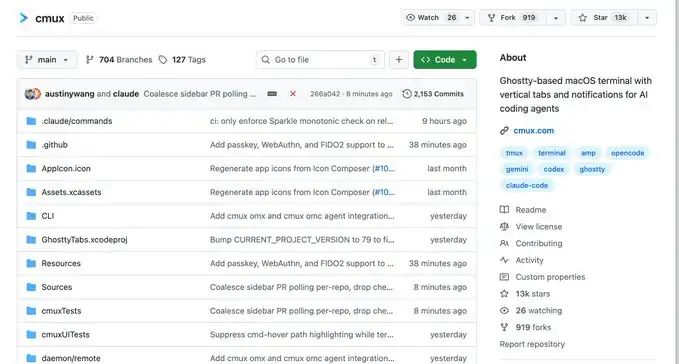
First off, I recommend a software called Cmux:
It is a macOS native terminal built on top of Ghostty, designed for running multiple coding agents simultaneously: vertical tabs + smart sidebar, flexible splitting, smart notification highlights, built-in browser splitting + Socket API.
This is an open-source project: https://github.com/manaflow-ai/cmux
My favorite feature is the split-screen function, but once I split the screen, I lose track of which window is for what task.
Fortunately, this software directly highlights a specific terminal area to help you switch to the corresponding window promptly.
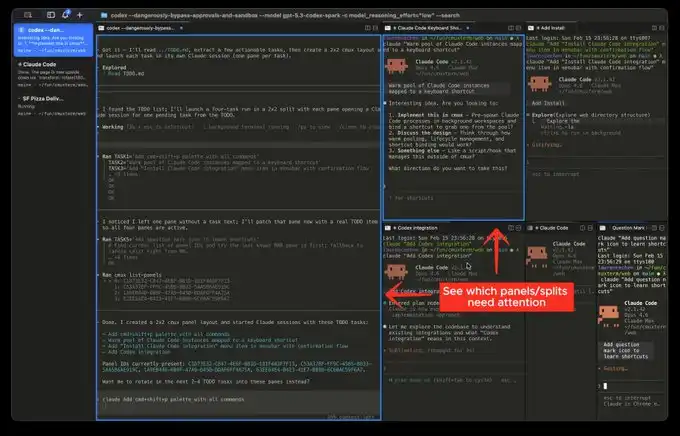
Official Website Image
But the next software I'm going to introduce will make this type of switching extremely smooth:
This is the product that has been quite popular recently, called Vibe Island
Isn't the UI attractive? However, the most impressive aspect of this product is its support for switching between various tools
And each switch will automatically invoke, bring forward the window of the respective APP, then you can type away.
In theory, as long as you switch fast enough and have enough windows open, it will continuously push the windows that need attention in front of you. It gives you a feeling of being on an assembly line processing tasks.
Finally
I hope this content is helpful to you. This is relatively beginner-friendly, but actually considered common knowledge for programmers.
Still, I hope it can assist you. If you find this content helpful!
This content is provided for general informational purposes only and doesn't constitute financial, investment, legal, or tax advice. Any events, rewards, online promotions, or related information mentioned herein should not be considered a recommendation, solicitation, or invitation to purchase, sell, trade, or otherwise deal in any crypto assets. Crypto assets are highly volatile and may result in loss. The availability of WEEX services, products, and related events may vary by region. You are responsible for ensuring that your participation is in accordance with applicable local laws and regulations.
You may also like

USDC Stablecoin Expands to XRP Ledger, Boosting Cross-Chain Transfers
Imagine having a reliable digital dollar that moves seamlessly across blockchain networks, much like how cash flows effortlessly…

Ripple’s RLUSD Stablecoin Gains Momentum Among Everyday Users Despite Institutional Roots
As of August 5, 2025, Ripple’s RLUSD stablecoin continues to surprise the crypto world by attracting a growing…

Bitcoin: Buy High and Sell Low, Strategy Justifies and Explains Its Choices

Strong Yen Pressures Nikkei and Exposes Bank of Japan's Dilemma

Bitcoin Golden Cross Approaches: The 12 Previous Instances That Call for Caution

Standard Chartered brings institutional Bitcoin, Ether trading to UAE

43% of Indonesian Fintechs Have Turned a Profit, IDX Ready to Support IPOs

Tether’s USDT0 launches on Stellar with cross-chain liquidity
Interest Rate Hike Probability Rises from 37% to 67% in a Week, New York Fed President: Long-Term Bond Yields Reflect Economic Strength
Hyperliquid Strategies Increases Equity Financing Limit to $2.5 Billion (Additional Submission to SEC)
10 Trillion Euros in Dormant Savings: What the EU Wants to Do with Your Money

XRP Ledger tested by BIS researchers for data checks

Some establishments are likely to be closed
2026's Most Wild DeFi Yield Strategies: No Betting on Explosive Growth, Just Harvesting On-Chain Speculation Fees

Bessent names digital assets among possible targets in Iran sanctions push

AI Wars II Is Here: WEEX Labs Launches Its Biggest Human vs. AI Trading Showdown Yet, Early Bird Round Opens Sept 3
WEEX Labs officially launches AI Wars II, the second season of its Human vs. AI trading championship. Early bird registration opens Sept 3-6, with the first 20,000 users sharing a 100,000 USDT prize pool. Register now.

Ethereum versus Solana: Which L1 captures more value?

Fables Points Program Ends in October: Is the 'Quick and Easy' US Stock Market Making Agreement Worth Participating?
Robinhood Chain Activity Surges as Microsoft Separately Discloses Azure Revenue and Broadcom Slips After Hours | WEEX TradFi Daily Brief (Sep. 3, 2026)
This brief focuses on Robinhood Chain’s sustained on-chain trading momentum and its direct revenue contribution to the Arbitrum ecosystem, Microsoft’s move to improve transparency around Azure and AI infrastructure revenue, and Broadcom’s growing tension between strong AI semiconductor growth and rising market expectations. Investors are also turning their attention to the U.S. August nonfarm payrolls report and Ciena’s earnings as the next tests for the macro rate path and AI networking demand.
What Challenges Does Stock Tokenization Face?

x402 Since Launch: 150 Million Transactions, Settlement Amounts, and a Review of Real-World Use Cases

Nonfarm Payrolls Preview Before Friday: How Will the Fed Choose Between Cooling Employment and Rising Inflation?
Countdown to Arc Mainnet: Where Will the First Batch of Traffic Flow?

London Stock Exchange Partners with Payward to Tokenize 100 UK Stocks

No Matter Whether Warsh Raises Rates or Not, He is Definitely One of Us

Despite Cryptocurrency Gains, Shareholders Remain Unsmiling: Kaiko Research Diagnoses Structural Limitations of DAT
Cornell University Survey: 90% Awareness of Bitcoin but Only 13% Understanding; Japan Reports Highest 'Difficult to Understand' Responses Among 25 Countries
What is short selling? The trading minute

Wall Street Morning Brief: U.S. Treasury Sell-off Pauses, U.S. Stocks Rise, Software Stocks and Japanese Bond Auction Hide Concerns

Rain contract exploit drains $1.1M from card users
USDC Stablecoin Expands to XRP Ledger, Boosting Cross-Chain Transfers
Imagine having a reliable digital dollar that moves seamlessly across blockchain networks, much like how cash flows effortlessly…
Ripple’s RLUSD Stablecoin Gains Momentum Among Everyday Users Despite Institutional Roots
As of August 5, 2025, Ripple’s RLUSD stablecoin continues to surprise the crypto world by attracting a growing…
Bitcoin: Buy High and Sell Low, Strategy Justifies and Explains Its Choices
Strong Yen Pressures Nikkei and Exposes Bank of Japan's Dilemma
Bitcoin Golden Cross Approaches: The 12 Previous Instances That Call for Caution
Standard Chartered brings institutional Bitcoin, Ether trading to UAE


